
Whether you had a positive or negative experience with a business, knowing
How to write a review on Facebook is an easy way to share your feedback and help others make the right informed decisions.
Facebook reviews are crucial for building trust, influencing purchasing decisions, and improving online reputation of the business.
Whether you are reviewing a local restaurant, retail store, healthcare provider, hotel, or service company, having well-written insights provides insights for both customers and business owners.
Today, Facebook uses a Recommendations system, that allows users to select Recommend or Don’t Recommend and explain their experience in detail.
A thoughtful Facebook review is not just an opinion that highlights product quality, customer service, professionalism, pricing, and overall satisfaction. This includes honest and specific details which makes your customer feedback more credible and useful to readers.
For businesses, Facebook business reviews are an important source of customer feedback. Positive reviews increase credibility, attract new customers, and improve brand reputation, but criticism helps businesses to identify aspects for improvement. Managing and responding to reviews shows a commitment to customer satisfaction.
This detailed blog explains how to write a review on Facebook step by step using both desktop and mobile devices. You will also learn how to leave a Facebook review, what to include in your feedback, common mistakes to avoid, review examples, and best practices for writing meaningful reviews.
Whether you are a first-time reviewer or want to create more helpful recommendations, this blog will help you write reviews which are informative, trustworthy, and valuable for the Facebook community.
Also Read: How to Manage Online Review for Your Business
What Is a Facebook Review?
A Facebook review is feedback that customers leave on a business’s Facebook Page to share their experience with their products or services.
Facebook now uses a Recommendations feature, which lets users choose whether to Recommend or Don’t Recommend and also explain the reasons why they choose Recommend or Don’t Recommend.
Reviewers can also add photos or videos to make their reviews informative and credible.
Also Read: Why Customer Reviews are Important for Business Growth
Key Features of Facebook Reviews
- Choose Recommend or Don’t Recommend.
- Write a detailed review based on your experience.
- Upload photos or videos for additional context.
- Help other customers make informed decisions.
- Build trust and credibility for businesses.
- Provide valuable customer feedback for service improvements.
Facebook reviews provide insights from real customers, while customers benefit from more social proof, stronger customer engagement, and customer feedback which supports consistent improvement.
Why Facebook Reviews Matter
Facebook reviews help customers to make informed purchasing decisions as it offers genuine feedback from people who have used a business’s products or services.
It allows users to compare business, assess product quality, customer service, and reliability, which reduces the risk of poor choices. Authentic customer reviews provide trustworthy insights which go beyond advertisements, which help customers choose businesses with more confidence.
Also Read: How to Use Customer Feedback to Grow Your Business
Benefits for Businesses
Positive Facebook reviews has several advantages:
1. Build Customer Trust
While positive Facebook reviews help to build business credibility and encourage more customers to trust your business. As people will value recommendations from real customers more than advertisements.
Genuine customer reviews can highly influence customer buying decisions and increase the trust of customers in your product.
2. Improve Brand Reputation
Having a Facebook Page with consistent and authentic reviews builds a strong first impression and increases the online reputation of your brand.
Where positive customer feedback shows that your business provides quality products or services that gives them a competitive edge over competitors and attracts new customers.
3. Increase Customer Engagement
Businesses that quickly respond to customer reviews both positive or negative indicate that you value customer opinions and are committed to providing good service to customers.
Because when businesses regularly interact with their reviewers, it helps them to improve relationships with customers, builds customer loyalty, and encourages more people to share their experience.
4. Gain Valuable Customer Feedback
Facebook reviews offer insights that the aspects of the business that customers appreciate about your businesses, and aspects where improvements are required.
With these insights businesses can use customer feedback to improve products, customer service, improve operations, and also resolve frequent problems that lead to better customer satisfaction over time.
5. Influence Purchasing Decisions
Before choosing a business, most consumers read Facebook reviews. When a business page has many positive recommendations and detailed customer experience, it seems more trustworthy and reliable that increases the chances that potential customers choose your business over competitors that have less positive reviews.
Also Read: How Businesses Can Improve Customer Satisfaction
Before You Write a Facebook Review
Before writing a Facebook review, customers must wait a moment and ensure that their feedback is honest, accurate, and based on personal experience.
A well-written customer review helps other customers make informed decisions that give essential feedback of businesses which help them to improve products and service.
So it is essential for reviewers to add clear, balanced, and respectful reviews which are the most valuable.
Before Posting Your Review
- Make sure you have personally used the product or service.
- Base your review on your own experience.
- Include specific details about your visit or purchase.
- Be honest, objective, and fair in your comments.
- Avoid exaggerations or misleading claims.
- Use respectful and professional language.
- Mention what impressed or disappointed you most.
- Add photos or videos if they support your feedback.
When reviewers add thoughtful and genuine reviews, it gives valuable insights for both customers and businesses.
Also Read: How to Track Customer Feedback in Real-Time
How to Write a Review on Facebook (Desktop)
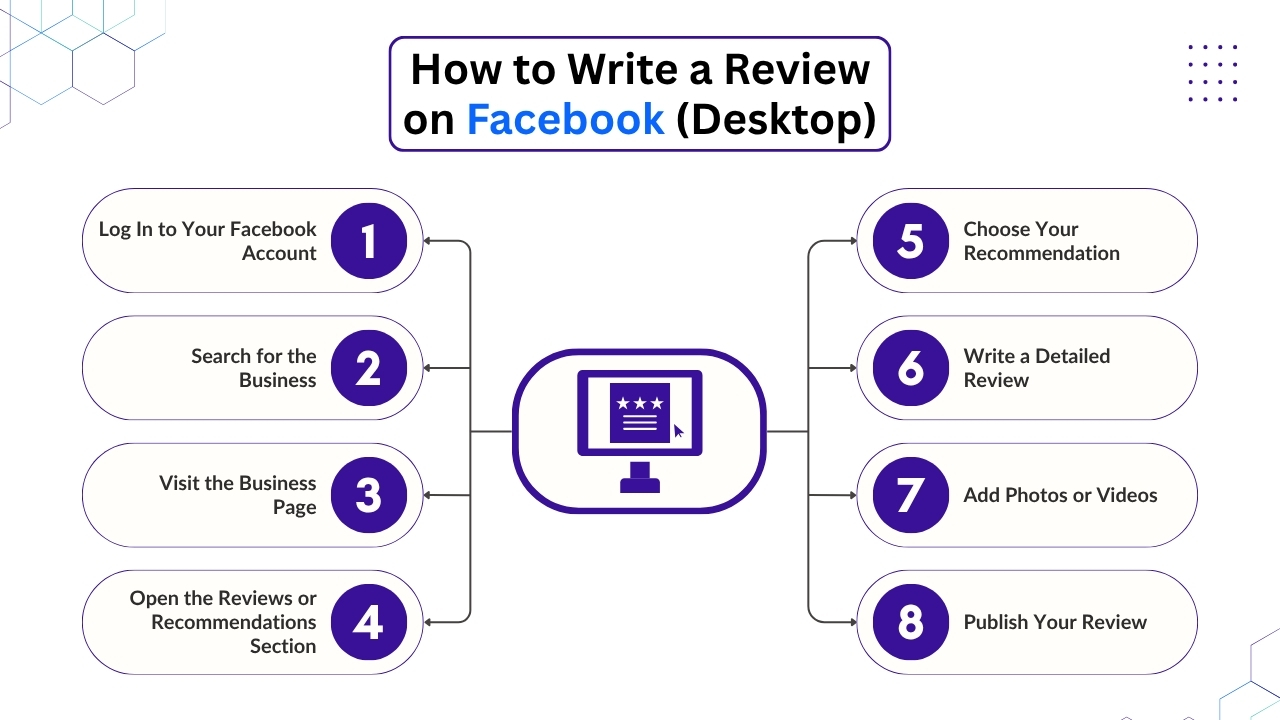
If you are using Facebook on a desktop or laptop, leaving a review is a straightforward process.
Below are the steps to share your experience and help other users make informed decisions.
1. Log In to Your Facebook Account
Open your preferred web browser and visit Facebook. Sign in by using your email address or phone number and password. Make sure you are logged into the account you want to use for posting the review.
And if you manage multiple Facebook accounts, verify that you are using the correct one before continuing.
2. Search for the Business
Then the users may use the search bar at the top of the Facebook homepage, and enter the name of the business you want to review.
Select the official business page from the search results. Ensure that you choose the correct page, especially if there are businesses with similar names or multiple locations.
3. Visit the Business Page
Once you have found the accurate business, open its Facebook Page. Browse the page shortly to confirm that it’s the business you interacted with. You can review the profile information, contact details, recent posts, and customer reviews to verify that you are on the right page.
4. Open the Reviews or Recommendations Section
Then the users must navigate to the Reviews or Recommendation tab on the business page. If this section is not visible, then the business may have disabled customer reviews or recommendations.
If customer reviews are enabled, then you will see the option to share your experience with other Facebook users.
5. Choose Your Recommendation
Facebook uses a recommendation system rather than star rating. Select either Recommend if you had a positive experience or Don’t Recommend if your experience was unsatisfactory.
Choose the option that honestly shows your overall opinion of the business.
6. Write a Detailed Review
After choosing your recommendation, write a clear and informative review. Mention crucial details like the quality of the product or service, customer service, staff professionalism, pricing, delivery, or response time, and overall customer satisfaction levels.
Consumers must be honest, specific, and respectful so that your review is helpful to both potential customers and the business.
7. Add Photos or Videos
If customers add relevant information, upload photos or videos to support your review. Then images of products, completed services, meals, or business premises can make your customer feedback more authentic and offer valuable context for other users.
Ensure that your photos or videos accurately show your experience with products or services.
8. Publish Your Review
Once you have reviewed your comments for accuracy and clarity, click the Post button to publish your recommendation.
Your review will appear on the business’s Facebook Page, where it can be viewed by other users, which is subject to Facebook’s Community Standards and the business’s review settings.
If your experience changes in the future, then you edit or delete your review at any time.
Also Read: Google Review Management Software
How to Write a Review on Facebook (Mobile App)

For customers adding a review using the Facebook mobile will be a quick and convenient way to share your experiences about a business. For accessing Facebook, if you are using an Android device or an iPhone, the process will be simple and takes only a few minutes.
When consumers add a detailed and honest review of a business, it not just helps them to improve services but also helps potential customers to make informed purchasing decisions.
Follow the steps below to leave a helpful Facebook review from your mobile device.
1. Open the Facebook App
The initial step is to download the Facebook app on your Android smartphone or iPhone. If you are already signed in, then enter your login credentials to open your account.
Users must ensure that they are using the latest version of the Facebook app, as features and navigation may change with new updates. Using an updated app ensures that you can easily open the Reviews or Recommendations section.
2. Search for the Business
Tap the search icon located at the top of the Facebook app and type the name of the business that you want to review. Browse the search results carefully and choose the official Facebook Page.
If the business operates at multiple branches or locations, verify the address, profile picture, and business information to ensure that you are reviewing the right location when you received the product or service.
3. Visit the Business Page
After choosing the business, open its Facebook Page. Reviewers must spend a moment confirming that you have reached the accurate page by checking the business name, contact information, operating hours, and recent posts. This simple step helps to avoid any accidental review posts on a similarly named business or an unofficial page.
4. Navigate to the Reviews or Recommendations Section
Scroll through the business page until you find the Reviews or Recommendations tab. Based on the app version, this section may appear under the page menu or further down the profile.
And if you are unable to find reviews or recommendations, then the business may have disabled customer reviews or recommendations. And whenever available, tap the section to start writing your review.
5. Choose Recommend or Don’t Recommend
Facebook uses a recommendation system instead of a five-star rating. People can select Recommend if your experience was positive or Don’t Recommend if it did not meet your expectations.
Choose the option that honestly shows your experience. Because your recommendation helps other users quickly understand your overall opinion before reading the full review.
6. Write Your Comments
Ensure you write a clear, detailed, and balanced review describing your experience with their products or services. Mention important aspects like product quality, customer service, staff behavior, communication, delivery speed, pricing, cleanliness and overall satisfaction with the product.
They must include specific instances whenever possible, because detailed reviews are more credible and helpful than short comments like “Great service”, or “Bad experience”. Be honest, respectful, and focus on factual information rather than emotional reactions.
7. Upload Photos or Videos
If appropriate, attach images or videos to support your review. Images of products, completed work, event venues, or business premises offer additional context and make your review more trustworthy.
Because images allow other customers to better understand your experience and help businesses to show authentic customer feedback. Before uploading, ensure your photos accurately represent your experience and do not include sensitive personal information.
8. Submit Your Review
Once you have finished writing your review, read it carefully to check if there are any spelling, grammar mistakes. When you are satisfied, tap the Post button to publish your recommendation.
Your review will appear on the Facebook page of the business, where other users can read it while researching the company. If your opinion changes later, for instance, if the business resolves an issue then you can edit or delete your review at any time.
Keeping your review accurate and up to date ensures it remains a valuable resource for both businesses and future customers.
Also Read: How to Respond to Negative Customer Reviews
What Makes a Good Facebook Review?
A good Facebook review is honest, clear, and informative. Instead of posting a short comment about the product like “Great” or “Bad service”, explain your experience with specific details.
A detailed review helps potential customers to understand what to expect and offer businesses with constructive feedback that can improve their products, services, and customer experience.
A High-Quality Facebook Review Should Answer:
- What product or service did you purchase?
- How was your overall experience?
- Were the staff friendly, helpful, and professional?
- Did the business meet your expectations?
- Would you recommend the business? Why or why not?
- What stood out most about your experience?
Having specific, balanced, and genuine feedback makes your review on facebook more credible and valuable, which helps customers to make informed decisions while supporting businesses in identifying their strengths and areas for improvement.
What Should You Include in a Facebook Review?
A well-written Facebook review offers useful information which helps potential customers understand your experience while giving businesses valuable feedback.
Rather than writing a short comment, include specific details that make your review informative, balanced, and trustworthy.
1. Describe Your Experience
Begin your review by explaining why they visited the business, or the products or services you purchased. Providing context helps readers to understand your experience.
For instance, you might mention that you visited a cafe for breakfast, ordered a custom birthday cake, booked a home cleaning service, or purchased a laptop online. Such an introduction provides a good introduction which is essential for the rest of your review.
2. Discuss Product or Service Quality
In your review describe whether the product or service met your expectations. Mention different factors such as product quality, performance, reliability, presentation, if it is valuable for money.
For instance, you could explain that the food was fresh, the product was well made, or the service was completed efficiently. Because specific details make your customer feedback more useful.
3. Evaluate Customer Service
Providing essential information about customer review in your review is essential. Explain if the staff were friendly, helpful, professional, knowledgeable, and responsive.
In your review, mention the way your staff handled your reviews or concerns and whether they lead to an overall positive experience to customers.
4. Mention Delivery or Waiting Time
Your experience regarding delivery, appointments, or reservations, include details about delivery speed, waiting time, appointment scheduling, or order accuracy.
Explaining whether the businesses met expected timelines helps future customers know what to expect.
5. Share Your Overall Opinion
Reviewers must end their review by summarising your experience and stating whether you would recommend the business. Show the main reasons behind your recommendation or criticism. Because a clear, honest conclusion offers readers with a helpful overview while giving the business valuable feedback for future improvement.
Also Read: How to Use Review Monitoring Software to Manage Your Online Reputation
Tips for Writing Helpful Facebook Reviews
When customers write a thoughtful Facebook review, it helps other customers to make informed decisions while offering businesses with valuable feedback.
Following these best practices will make your review more credible, informative, and useful for everyone.
1. Be Honest
Always write your review on your genuine personal experience. Avoid elaborating positive or negative aspects, and don’t make claims you cannot support.
Having honest reviews builds trust within the Facebook community and provides businesses with accurate feedback they can use to improve their products or services.
2. Be Specific
Rather than writing a generic comment like “Great Service,” explain what made your experience memorable. Mention details like product quality, staff behavior, response time, pricing, or service efficiency. Providing specific instances make your review more helpful and trustworthy.
3. Keep It Professional
Even if your experience was disappointing, it is essential for customers to remain respectful and courteous. They must avoid insults, offensive language, personal attacks, or threats. Maintaining a professional tone in reviews increases the credibility of your review and encourages businesses to respond positively.
4. Mention Both Positives and Negatives
Having a balance between positives and negatives are often the most reliable. If customers had both good and bad experiences, then mention them fairly.
Emphasize what the business did well while also explaining any areas that could be improved. This gives readers a complete view of experiences with products or services.
5. Include Photos or Videos
If appropriate, upload photos or videos to support your review. Images of products, meals, completed work, or business premises give more context and make your feedback more authentic and informative for other customers.
6. Proofread Before Posting
Before publishing your review, check if there is any spelling, or grammatical mistakes. Because a clear, well-written review is easier to understand and ensures that your experience with the product or service is conveyed effectively. They must take a few more moments to proofread that helps make your review more valuable for both potential customers and the business.
Conclusion
Facebook reviews play an important role in helping consumers make informed decisions while helping businesses to build trust and improve their services.
A well-written review goes beyond simply recommending or not recommending a business as it explains your experience in a clear, honest, and respectful way.
Your review must include impactful details regarding product quality, customer service, communication, and overall satisfaction that makes your feedback far more valuable to future customers.
For businesses, actively managing Facebook reviews is just as crucial as receiving them. By responding promptly, learning from customer feedback, and encouraging satisfied customers to share their experiences can improve their brand reputation and develop long-term customer loyalty.
As review volumes grow across multiple platforms, solutions like Clariv simplify reputation management by centralising reviews, offering AI-powered insights, and helping teams to respond more efficiently.
By considering customer feedback as an opportunity for continuous improvement, both consumers and businesses can lead to a more transparent, trustworthy, and engaging online community.
If you still have any query about how to review on Facebook then you visit Clariv and we are more than happy to assist you.