Adding your business to Apple Maps is an effective way to increase your business visibility among locals and connect with millions of Apple users searching for nearby products and services.
As Apple Maps comes pre-installed on iPhones, iPads, Macs, and Apple Watches, it has become a trusted navigation and local-based search platform for restaurants, retail stores, healthcare providers, hotels, and service-based businesses.
Businesses that learn how to add a business to Apple Maps ensure that your organization appears with right contact details, direction, business hours, and crucial details that help potential customers to find and choose your business.
Using Apple Business Connect, businesses can create or claim their business listing, verify business ownership, upload photos, manage their Apple Maps business listing, and update essential information whenever changes happen.
A complete and optimized listing not just improves the customer experience but also improves your local SEO strategy by improving your presence across Apple’s ecosystem.
For businesses that focus on reputation management, platforms like Clariv can further improve your Apple Maps strategy by helping monitor customer reviews, analyze feedback, and identify ways to improve customer satisfaction.
Combining optimized Apple Maps profiles with insights from Clariv helps businesses to manage right information, build customer trust, and make decisions based on data that support long-term business growth.
In this detailed blog, we will walk you through how to add your business to Apple Maps, verify your listing, improve your Apple Maps business profile, avoid common mistakes, and use best practices to increase visibility, attract more local customers, and improve your digital presence in a highly competitive market.
Also Read: Google Review Management Software
What Is Apple Business Connect?
It is Apple’s official platform for businesses to manage how they appear across Apple Maps and other Apple applications.
Rather than depending only on third-party data sources, businesses can now directly control the information customers see when searching for their company.
Using Apple Business Connect, you can:
- Claim your business listing
- Add a new business location
- Edit contact information
- Update business hours
- Upload logos and photos
- Display special offers
- Add promotional content
- Manage multiple locations
- View customer engagement insights
- Keep information consistent across Apple devices
Since Apple Maps comes pre-installed on Apple devices, maintaining an accurate listing helps customers to easily find your business without downloading additional apps.
Also Read: How Businesses Can Improve Customer Satisfaction
Why Should You Add Your Business to Apple Maps?
Adding your business to Apple Maps helps businesses to increase visibility of your businesses among millions of Apple device users who are searching for local products or services.
Although many businesses focus on Google Business Profile, maintaining an Apple Maps listing grows your reach and improves digital presence of your businesses.
Below are five important benefits:
1. Increase Local Visibility
Having a verified profile on Apple Maps listing increases your business chances to appear when people search businesses based on location.
When users search for nearby businesses, Apple Maps show valid search results based on location proximity of your business, business category, search intent, which help more people to find your business.
Also Read: Online Reputation Management Complete Guide
2. Enhance the Customer Experience
Having your business listed on Apple Maps offers customers crucial information in one place, that includes your business address, directions, phone number, website, business hours, photos, and business description.
With easy access to the right information of business, customers can make informed decisions and encourage repeat visits.
Also Read: How to Use Review Monitoring Software to Manage Your Online Reputation
3. Build Brand Credibility
A claimed and verified Apple Maps listing demonstrates that your business information is authentic and actively managed. While accurate details and updated content increases trust of customers and creates a professional first impression.
4. Improve Mobile Discovery
Apples Maps is widely used on iPhones, iPads, Macs, and Apple Watches for local business searches and for navigation. When businesses appear in these searches, it increases opportunities for businesses to attract nearby customers who are willing to visit or contact your business.
5. Strengthen Your Local SEO
It is essential for businesses to maintain consistent business information across Apple Maps, your website, and other online directories that supports your overall local SEO strategy and improves your online visibility.
Also Read: How AI Sentiment Analysis Software Turns Customer Feedback into Growth Opportunities
Benefits of Using Apple Business Connect
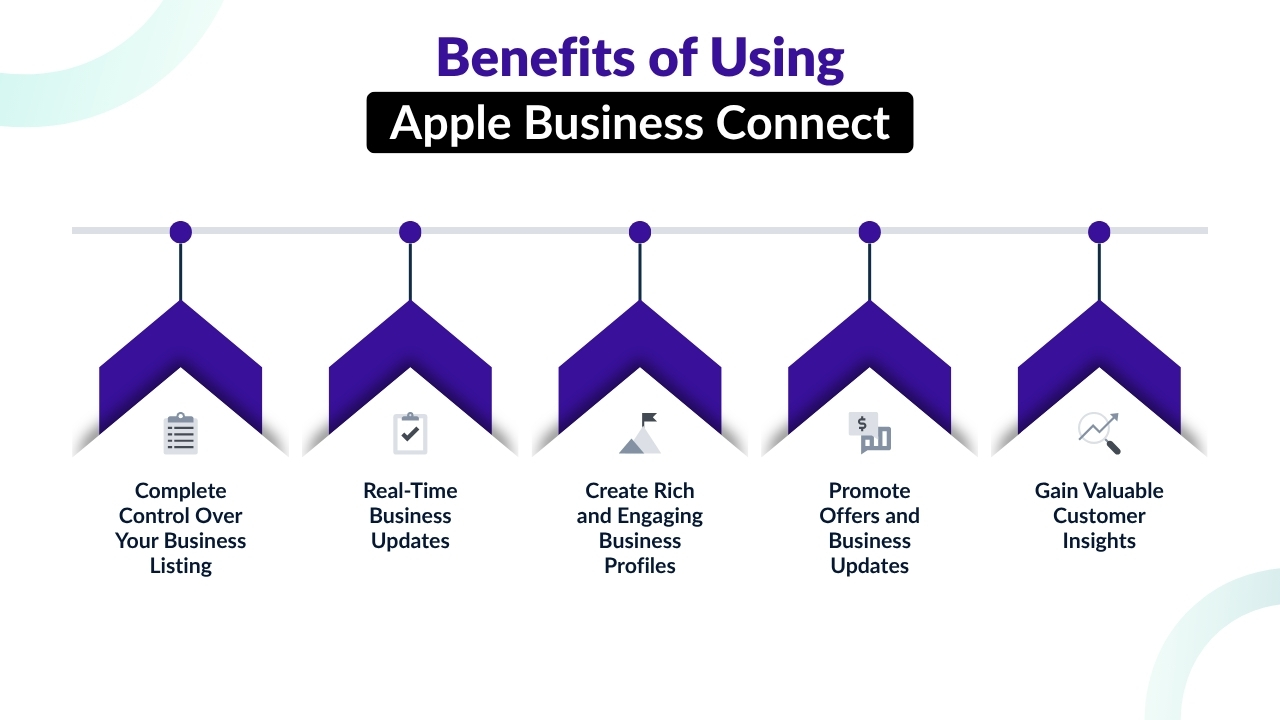
Apple Business Connect allows businesses to go beyond just businesses getting listed, it provides the tools to manage their online presence and connect with customers more effectively.
Here are five key benefits of using the platform:
1. Complete Control Over Your Business Listing
It allows you to manage every aspect of your profile on Google Maps. Allowing users to update your business name, address, phone number, website, categories, and order details and thereby ensuring companies always find the right and reliable information.
2. Real-Time Business Updates
Through this platform businesses can instantly update details like operating hours, holiday schedules, contact details. With real-time business updates help to prevent any form of confusion for customers and ensures visitors have the most recent information before planning a visit.
3. Create Rich and Engaging Business Profiles
Businesses can improve their Place Card by uploading a logo, cover image, interior, exterior images of your business offices, product images, and service images.
With high-quality images businesses can showcase their brand, attract more customers, and provide a better understanding of your business.
4. Promote Offers and Business Updates
With the Showcases feature, businesses can highlight seasonal promotions, new products, upcoming business events, and special announcements directly on Apple Maps listing. This helps businesses to keep customers informed and encourages them for repeat visits.
5. Gain Valuable Customer Insights
It provides performance insights that show the way customers interact with your Place Card, that includes engagement patterns of customers.
These analytics help businesses to measure business visibility, understand customer behavior, and make informed decisions to improve their marketing strategy.
Also Read: How AI Can Analyze Customer Feedback
What You Need Before Adding Your Business
Before adding your business to Apple Maps, it is essential for businesses to gather all the necessary business information. Keeping accurate details ready will make the registration and verification process faster while ensuring that your business profile is complete.
Below are the essential details you should prepare:
1. Business Name
Businesses must use the official business name consistently as it appears on their website, signage, legal documents. Being consistent with businesses helps customers to find your brand and supports local SEO.
They must avoid keyword stuffing, promotional phrases, or unnecessary location names unless they are officially part of your business name.
2. Physical Address and Contact Information
Businesses must prepare your complete business address that includes the street address, city, state, ZIP or postal code, and country. They must ensure that the address should exactly match with the address provided on your website and other online directories.
Businesses must also offer a local business phone number and official website URL so customers can easily contact or learn more about your business.
3. Business Category and Operating Hours
Choose the category that best describes your primary business like restaurant, coffee shop, clothing store, hotel, dentist , auto repair shop, or real estate agency.
Choose the category that helps Apple Maps display your business in valid search results. Additionally businesses must prepare their regular business hours, holiday schedules, seasonal timings, and closure dates to ensure customers have the right information.
4. Business Logo and High-Quality Photos
Upload high-quality photos of your company logo to improve your brand recognition. They must also prepare high-quality images of your storefront, interior, products, services, team members of menu items if applicable.
With high-quality images businesses can make your Place Card more attractive and help customers to understand their expectations about businesses before visiting your business.
5. Additional Business Details
They must consider preparing a clear business description that explains your products or services along with valid social media links or booking options if available.
Businesses must thoroughly check that all business information is accurate and consistent across your website,Google Business Profile, and other online listings.
With a complete and well-maintained Apple Maps increases customer trust, local visibility of your business, and provides a better overall user experience.
Also Read: What is Customer Sentiment Analysis
How to Add Your Business to Apple Maps
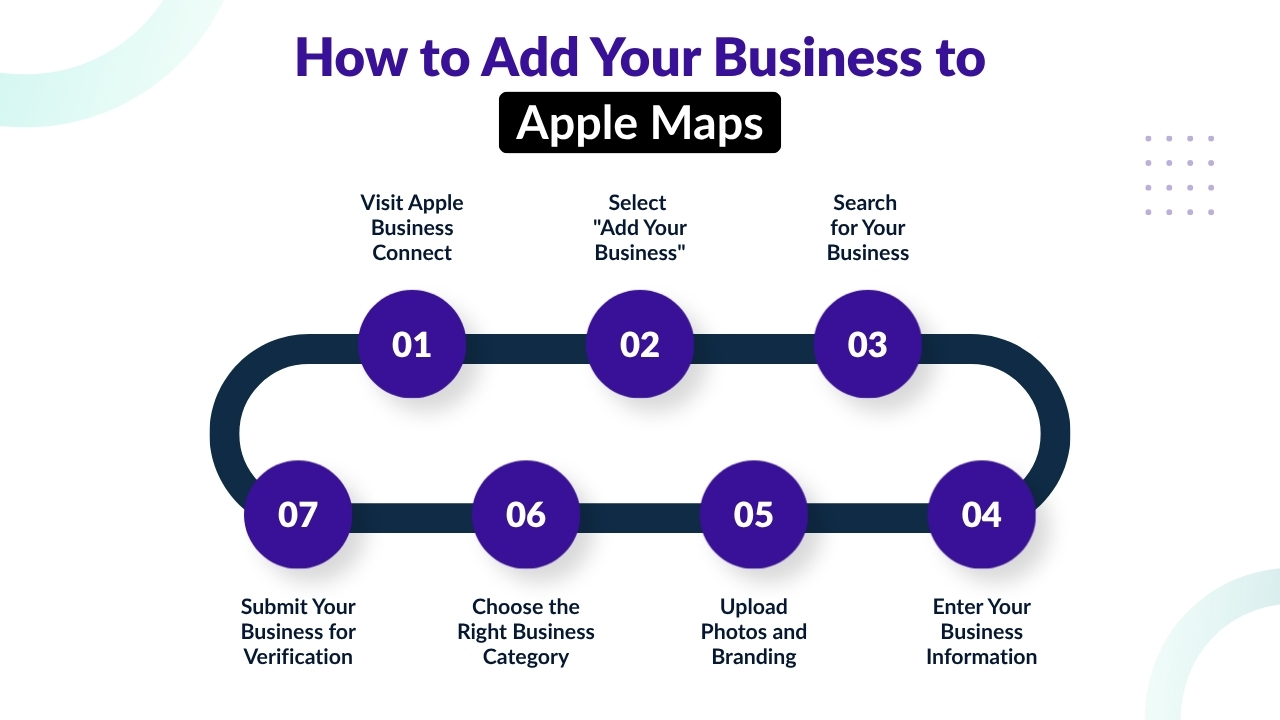
Adding your business to Apple Maps is a simple process with Apple Business Connect, which is a free platform of Apple for managing business listings.
They can follow the below steps and create your business profile, verify ownership, and ensure customers can easily find the right information about your business.
1. Visit Apple Business Connect
The initial step is to visit the Apple Business Connect portal and sign in using your Apple Account. Businesses that do not have an Apple Account will need to create an Apple Account first before proceeding.
Once you are signed in to your Apple Account, then you will gain access to the dashboard where you can add, claim, or manage your business listings.
Apple Business Connect works as the central platform for updating your business details, uploading images, and tracking your Place Card.
Using an account associated with your business is recommended for easier management and future updates.
2. Select “Add Your Business”
After signing in, choose the “Add Your Business” option from the dashboard. Before letting businesses create a new listing, Apple asks businesses to search for an existing business profile.
It is an important step because it helps businesses to avoid duplicate business listings and ensures that businesses listed on Apple Maps are claimed instead of recreated.
If your business already exists, then you can start the ownership verification process. If there is no matched business found, then businesses can proceed by creating a new business profile.
3. Search for Your Business
Businesses must enter their business name, physical address, and phone number into the search field. Then the Apple platform will compare your information with existing listings in its database.
When your business appears, choose the correct Place Card and claim it. If your business does not have a listing, then they can continue by creating a new profile.
They must carefully review the search results to prevent chances of duplicate entries, as duplicate listing can confuse customers and negatively impact visibility of businesses.
4. Enter Your Business Information
Next, complete your business profile by providing right and up-to-date details. Businesses must include their official business name, complete address, phone number, website URL, main business category, operating hours, and a clear business description.
Ensure that the information matches with your website and other online directories to maintain consistency. Before submitting, businesses must carefully review every detail to find if there is any spelling mistakes or if there is any outdated information, as maintaining business accuracy is essential for gaining trust of customers and improving visibility of businesses on local searches.
5. Upload Photos and Branding
Images help businesses to create a strong first impression and encourage customers to learn more about your business. Businesses must upload a high-quality business logo, an attractive cover photo, and professional images of your storefront, interior, products, services, or team members.
If applicable, restaurants can include menu photos, while retailers can show popular products. They must use clear, recent images that accurately represent your business. Avoid blurry, low-quality, or outdated photos, as they can reduce customer trust.
6. Choose the Right Business Category
Choosing the right business category helps Apple to understand your business and display it in valid search results. Select the category that best describes your primary business activity, like Italian Restaurant, Hair Salon, Fitness Center, Pharmacy, or Electronics Store.
If your business provides multiple services, then you can also add secondary categories where appropriate. Choosing the right categories improves your chances of appearing in valid local searches and helps customers to instantly identify the products or services you provide.
7. Submit Your Business for Verification
The final step is to verify your business ownership. Apple needs verification before giving your full control over your Place Card. Based on your business type and location, verification may be completed through a phone call, email, official business documents, or manual review.
After submitting your information, Apple reviews your application to confirm that you are authorized to manage the listing. After approval, you will gain full access to Apple Business Connect, allowing you to update your business details, publish promotions, upload new photos, track customer engagement, and keep your Apple Maps listing accurate and up to date.
Also Read: How to Respond to Negative Customer Reviews
How to Verify Your Business on Apple Maps
After submitting your business information, Apple requires you to verify ownership before you can fully manage your Apple Maps Place Card. Verification ensures that only authorized business owners can edit listing details, which helps to maintain accurate information for customers.
Based on your business type, location, and existing records, Apple may offer one or more of the following verification methods.
1. Phone Verification
It is one of the fastest ways to verify your business. If your business phone number is already linked to your location, then Apple may send a verification code via a phone call or text message.
By simply selecting the phone verification option, receive the code, enter it into Apple Business Connect, and confirm your ownership.
2. Email Verification
Some businesses can verify ownership using a business email address associated with their website domain. Apple sends a verification email containing a confirmation link or code to an authorized email address. Once verified, you can continue managing your listing.
3. Document Verification
If there is no automatic verification, then Apple may request supporting documents to confirm your business. Documents may include a business license, utility bill, lease agreement, tax registration certificate, or articles of incorporation.
These documents help Apple to verify that your business operates at the listed address.
4. Manual Review
In certain situations, Apple manually reviews your application. This process is generally needed when additional verification is required or if submitted information cannot be confirmed automatically.
Based on the complexity of the review, business approval may take several business days.
5. Tips for a Smooth Verification Process
To avoid delays, businesses must ensure that their business name, address, phone number, and website match well with the details on your official documents and other online listings.
They must submit clear, valid documentation if requested and track your Apple Business Connect account for updates. With the right details helps businesses to complete the verification process more efficiently.
Also Read: Brand Reputation Management Software
How Long Does Apple Maps Verification Take?
The time needed to verify your business on Apple Maps is based on the verification method selected and the correctness of the information that businesses provide.
Businesses that submit complete and consistent details usually have a faster business verification process. And if additional documents or manual review are required, then the approval may take more time.
To avoid unnecessary delays, ensure your business information aligns with your official records and other online listings.
Typical Apple Maps verification times include:
- Phone Verification: This verification is completed usually within a few minutes after users enter the verification code.
- Email Verification: This verification is completed usually within minutes once you confirm the verification email.
- Document Verification: This verification usually takes 2-7 business days, based on the review process of Apple.
- Manual Review: This verification may take up to 10 business days if Apple needs additional verification.
Providing the right business details and responding quickly to any verification requests can help to make the approval process quick and allow you to manage your Apple Maps listing sooner.
How to Claim an Existing Apple Maps Business Listing
Many businesses already have a Place Card on Apple Maps as Apple collects business data from public directories and trusted data partners.
When your business is already listed, then they must claim the existing listing instead of creating a duplicate listing.
Follow these steps:
1. Search for Your Business
Sign in to Apple Business Connect and search for your business using its official name and physical address. Carefully review the search results to locate the accurate Place Card.
2. Select the Existing Listing
If your business appears, choose the matching listing. Confirm that the address, business name, and contact details are accurate before proceeding with the claim.
3. Verify Business Ownership
Complete verification process of Apple to prove that you own or are authorized to manage the business. Verification may be completed through a phone call, email, supporting documents, or manual review.
4. Manage Your Business Listing
Once business ownership is verified, then you will gain complete editing access to your Place Card. You can update your business name, address, phone number, website, business hours, categories, photos, and promotional content.
Claiming your existing business listing helps to prevent duplicate business entries while ensuring customers always see accurate and up-to-date business information.
Also Read: Customer Sentiment Vs Traditional Surveys
How to Edit Your Apple Maps Business Listing
For businesses, it is essential to keep their Apple Maps business listing updated to maintain customer trust and offer the right information.
Because whenever business details change, businesses should promptly update your Place Card through Apple Business Connect. Regular business updates ensure that customers are easily able to find the right contact details, business hours, products, and services.
To edit your Apple Maps business listing:
- Sign in to Apple Business Connect.
- Select the business location that you want to manage.
- Update details such as business hours, phone number, website, address, services, products, photos, logo, or holiday schedules.
- Review the business information carefully and save your changes.
- Wait for Apple to review and publish the updates if additional verification is required.
Regularly maintaining your business listing shows that your business is active, reliable, and committed to providing customers with accurate and up-to-date information.
Also Read: AI Tools Analyze Customer Reviews
How to Optimize Your Apple Maps Listing
For businesses creating your profile on Apple Maps is just the beginning. Optimizing profile helps businesses to increase visibility of your businesses in local searches, attract more customers, and provides a better user experience.
Follow these five best practices to maximize the effectiveness of your Apple Maps business listing.
1. Write an Accurate Business Description
Businesses must create a clear and information business description that explains the products or services offered by businesses, unique aspects of your business, and about your target customers.
They must keep the business description clear, information, and customer-focused. They must avoid keyword stuffing or overstated marketing claims because it can reduce credibility of your business.
2. Choose the Most Relevant Categories
Businesses must select their primary business category which accurately shows your business and also add secondary categories if applicable. For instance, a business may select Bakery as its primary category and Coffee Shop as a secondary category.
When businesses are accurately categorized, it helps Apple to display your business in valid search results.
3. Upload High-Quality Photos
Businesses must improve your Place Card by uploading high-quality images of your storefront, services, staff, menu items, or office. They must use clear, up-to-date images that correctly show your business and create a good impression among users.
4. Add a Professional Business Logo
Upload a high-quality company logo to improve your brand image. A recognizable logo makes your Place Card more memorable and helps customers to easily find your business across Apple Maps.
5. Keep Business Hours Updated
Businesses must maintain the right operating hours such as holiday schedules, seasonal changes, special event hours. Updated business hours reduces customer frustration, increases customer trust, and ensures visitors have the right information about your business before they plan to visit.
Conclusion
Adding your business to Apple Maps is one of the simplest yet most valuable steps you can take to improve your local online presence. With millions of people using Apple Maps on iPhones, iPads, Macs, and Apple Watches, a well-maintained listing helps customers to find your business, find accurate directions, and access essential information when they are ready to visit or make a purchase.
Apple Business Connect gives business owners direct control over their Place Card, allowing them to update contact details, operating hours, photos, branding, promotions, and more from a single dashboard.
By completing the verification process, keeping information accurate, and regularly refreshing your profile with new content and visuals, you create a better customer experience while improving your visibility within Apple’s ecosystem.
For the best results, don’t treat your Apple Maps listing as a one-time setup. Review it regularly, keep details consistent across all online directories, and use available features such as Showcases and insights to engage customers.
Combined with a strong website and other local listings, an optimized Apple Maps profile can become a valuable part of your long-term local marketing strategy, helping you attract more customers and build lasting trust in your brand.
If you still have any query about how to add business to apple maps then you may Contact us at Clariv and we are more than happy to assist you.